Inhaltsverzeichnis
Motivation
Nachdem es mir nicht gelungen ist, einen verläßlichen Service für das Bereitstellen von "fortunes" zu finden, habe ich einen selbst erstellt.
Es gibt das Programm fortune(6), aber das ist nicht immer
installiert. Außerdem wollte ich einen Service programmieren.
Copyright, Lizenz und Quelltext
- Copyright 2026 Bernd Paffenholz.
- Diese Datei ist lizensiert nach GPLv3 oder höher.
- Der Quelltext ist bei github bereitgestellt.
Lösung
Die Datenbasis sollte die gleiche wie für das Programm fortune
sein. Die aktuelle Quelle ist das Projekt fortune-mod. Ich verwende
aber einen Klon, den ich kontrollieren kann, damit ich Ergänzungen
oder Streichungen vornehmen kann.
Die Textdateien mit den Zitaten werden in eine Datenbank geladen. Der Service liest aus der Datenbank.
Anwendung und REST-Schnittstelle
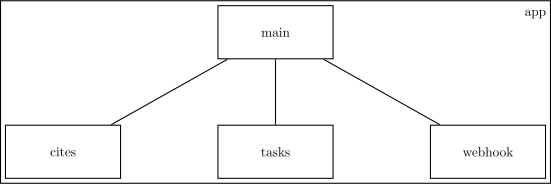
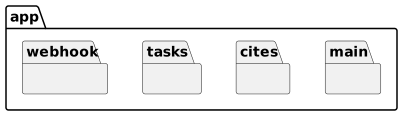
Es gibt drei Komponenten. In main ist die Definition der
Rest-Schnittstelle und die Initialisierung der Anwendung. Das Modul
tasks enthält die Aufgabenverarbeitung und in cites sind die
Datenbankzugriffe implementiert.
Alle Module liegen in der Domäne app.
from app.tasks import run_update_db
from app import cites
Für die Implementierung der REST-Schnittstelle wird das Framework FastAPI eingesetzt.
"""For Documentation see =fortuneFastApi.org="""
from http import HTTPStatus
import logging

from fastapi import FastAPI, HTTPException
from pydantic import BaseModel, TypeAdapter
Die Definition und Dokumentation der REST-Schnittstelle erfolgt über
Annotationen, Dokumentationskommentare und den Aufruf von FastAPI.
DESCRIPTION="""Every one goes with a quote.
See <a href="https://man.freebsd.org/cgi/man.cgi?query=fortune&apropos=0&sektion=6&manpath=FreeBSD+15.0-RELEASE+and+Ports.quarterly&format=html">fortune</a>.
Quotes are from <a href="https://github.com/BerndPaffenholz/fortune-mod.git">here</a>
which is a clone from <a href="https://github.com/shlomif/fortune-mod">fortune-mod</a>.
The fortunes from directory <code>off</code> are omitted.
"""

app = FastAPI(
    title="Fortune - Cookies",
    description=DESCRIPTION,
    summary="Cool sayings for everyone.",
    version="1.6",
    #terms_of_service="https://www.p4ffi.de/Impressum.html",
    contact={
        "name": "Bernd Paffenholz",
        "url": "https://www.p4ffi.de/Impressum.html",
        "email": "kontakt@p4ffi.de",
    },
    license_info={
        "name": "GPLv3",
        "url": "https://www.gnu.org/licenses/gpl-3.0.en.html",
    },
)

<<Mount static files>>

log = logging.getLogger("fortunes")
log.setLevel(logging.<<loglevel>>)
log_format = logging.Formatter(fmt='%(levelname)s: %(message)s')
handler = logging.StreamHandler()
handler.setFormatter(log_format)
log.addHandler(handler)

cites.init_app(app)

run_update_db_id = run_update_db.delay()
log.info("Task %s started.",run_update_db_id)

class Cookie(BaseModel):
    text: str
    category: str

class StatsEntry(BaseModel):
    category: str
    count: int

Stats = TypeAdapter(StatsEntry)

@app.get('/fortunes/v1', response_model=Cookie, tags=["fortunes"])
def get_one_random_cookie():
    try:
        found = cites.find_one()
        return found
    except LookupError as not_found:
        raise HTTPException(status_code=404, detail=not_found.args[0])
Die Definition des webhook-Dekorators ist ein eigenes Modul.
from app import webhook
@app.post('/fortunes/v1', tags=["fortunes"], status_code=HTTPStatus.ACCEPTED, \
          description='Webhook for github pull request. See <a href="https://docs.github.com/de/webhooks/using-webhooks/">github webhooks</a>')
@webhook.webhook_PR_github
def update_fortunes_database() -> dict:
    try:
        log.debug("post requested.")
        result = run_update_db.delay()
        return {"update-task-id": result.id}
    except Exception:
        raise HTTPException(status_code=500, detail="Problem with the workflow.")
@app.get('/fortunes/v1/categories', response_model=dict[str,int], tags=["categories"])
def get_category_stats():
    try:
        return cites.list_categories()
    except Exception:
        raise HTTPException(status_code=500, detail="Problem with the database.")

@app.get('/fortunes/v1/categories/{category}', response_model=Cookie, tags=["categories"])
def get_one_random_fortune_from_category(category: str):
    try:
        cookie = cites.find_one(category)
    except LookupError as problem:
        raise HTTPException(status_code=500, detail=f"Problem with category '{category}'.")
    if cookie is None:
        raise HTTPException(status_code=404, detail=f"Category '{category}' not found.")
    return cookie
Webhook
Der Webhook dient zum Aufruf von Aktionen, wenn bestimmte Ereignisse in einem Repository in github eintreten. Die Nutzung erfolgt durch die Dekoration eines Rest-Endpunktes.
Da ein Webhook der Aufruf einer Rest-Schnittstelle ist, wird die Funktionalität als Dekorator ausgeführt.
import logging
from typing import List, Any
from fastapi import Depends, Request, HTTPException, status
from fastapi.security import APIKeyHeader
from pydantic import BaseModel
import hashlib
import hmac

event = APIKeyHeader(name="X-GitHub-Event")
signature = APIKeyHeader(name="X-Hub-Signature-256")

class PullRequestBase(BaseModel):
    ref: str

class PullRequest(BaseModel):
    base: PullRequestBase
    merged: bool

class PayloadPullRequest(BaseModel):
    action: str
    pull_request: PullRequest

log = logging.getLogger("fortunes")

def webhook_PR_github (func):
    log.debug(f"webhook_PR_github")
    with open('/run/secrets/github',mode='r') as file:
        secret = file.read()
    async def webhook_pullrequest_from_git (payload: PayloadPullRequest, req: Request, \
                                            key: str = Depends(signature), event: str = Depends(event)):
        log.debug(f"checking for security {key},{event}")
        body = await req.body()
        log.debug("checking for security %s", payload)
        verify_signature(body, secret, key)
        log.debug(f"{payload}")
        if event == "pull_request" and \
           payload.action == "closed" and \
           payload.pull_request.base.ref == "main" and\
           payload.pull_request.merged:
            return func()
        log.info("Request not satisfying.")
        raise HTTPException(status.HTTP_200_OK)
    return webhook_pullrequest_from_git
Die Vorlage für verify_signature ist aus einem Beispiel von github kopiert.
Geprüft wird, dass der mit secret_token errechnete Hash von
payload_body mit signature_header übereinstimmt. Das beweist die
Authentizität der Nachricht.
Im Fehlerfall und bei Abweichungen wird HTTP-Statuscode 403 ausgelöst.
def verify_signature(payload_body, secret_token, signature_header):
    if not signature_header:
        raise HTTPException(status_code=403, detail="signature header missing!")
    hash_object = hmac.new(secret_token.encode('utf-8'), msg=payload_body, digestmod=hashlib.sha256)
    expected_signature = "sha256=" + hash_object.hexdigest()
    log.debug(f"expected_signature {expected_signature}")
    if not hmac.compare_digest(expected_signature, signature_header):
        raise HTTPException(status_code=403, detail="signatures didn't match!")
Schnittstelle Datenbank
Im Modul cites sind die Zugriffe auf die Datenbank
zusammengefasst. Die wesentlichen Funktionen sind das Auswählen eines
zufälligen Datensatzes durch find_one und eine Liste der Kategorien
mit Anzahl der darin enthaltenen Sätze (list_categories).
import logging
<<cites-import-standard>>

from pymongo import MongoClient
<<cites-import-specific>>

log = logging.getLogger("fortunes")

with open('/run/secrets/mongo',mode='r') as file:
    username = file.readline().strip()
    password = file.readline().strip()

mongodb = MongoClient("mongodb://mongo:27017/",username=username,password=password)
DATABASENAME = "fortune"
citesdb = mongodb[DATABASENAME].sayings
confdb = mongodb[DATABASENAME].config
log.warning("Mongo init ok.")

def close_db(_e=None):
    if mongodb is not None:
        mongodb.close()

def find_one (cat=None):
    query = ([] if cat is None else [{"$match": {"category": cat} }]) + \
        [{"$sample": {"size": 1}}]
    try:
        cursor = citesdb.aggregate(query)
        if cursor.alive:
            sample = cursor.next()
            return { k:sample[k] for k in ("text", "category") }
        return None
    except Exception as exc:
        log.error(exc)
        raise LookupError("Problem with sample.")

def list_categories () -> dict:
    counts = citesdb.aggregate([{ "$group": { "_id": "$category", "count": { "$count": {} } } }])
    stats = {c["_id"]: c["count"] for c in counts}
    return stats

def init_app(_app):
    if not DATABASENAME in mongodb.list_database_names():
        log.warning("no database")
        mongodb[DATABASENAME].config.insert_one({"name": 'git-commit-id', "value": None})
        return False
    return True
Refresh der Datenbank
Der Refresh der Datenbank kann im laufenden Betrieb erfolgen. Es wird
jeweils eine Kategorie gelöscht (remove_category) und die
entsprechende Datei wird zeilenweise eingelesen. Ein komplettes Zitat
(endet mit %\n) wird dann in die Datenbank geschrieben. Die Funktion
read_category_file_add_to_collection gibt außerdem die Kategorie und
die Zahl der darin enthaltenen Zitate zurück. Mit der Funktion
list_files_for_cites werden die Dateien mit den Kategorien ermittelt.
def add_saying_with_category (saying, category):
    citesdb.insert_one({"category": category, "text": saying })

def remove_category (category):
    citesdb.delete_many({"category": category })

def read_category_file_add_to_collection (file):
    count = 0
    saying = ""
    category = file.name

    remove_category(category)

    with file.open("r") as contents:
        for line in contents:
            if line == "%\n":
                if saying != "":
                    count += 1
                    add_saying_with_category (saying, category)
                    saying = ""
            else:
                saying += line

    log.debug({category: count})
    return {category: count}

def list_files_for_cites ():
    source = Path('/fortune-mod/fortune-mod/datfiles')
    lof = [str(f) for f in source.iterdir() if f.is_file() and f.suffix == ""]
    return lof
from pathlib import Path
from subprocess import check_output, call
def get_current_git_commit_id ():
    call(['git', 'pull', '--ff-only'],cwd="/fortune-mod")
    return check_output(['git', 'log', '-1', '--format=%H'], shell=False, text=True,cwd="/fortune-mod")

def get_db_git_commit_id ():
    commit_value = confdb.find_one({"name":"git-commit-id"})
    return "" if commit_value is None else commit_value["value"] or ""

def update_git_commit_id ():
    git_id = get_current_git_commit_id()
    confdb.update_one({"name":"git-commit-id"}, {"$set":{"value":git_id}}, upsert=True)
Celery
Die python-Code-Stücke für die Steuerung von Celery werden in die
Datei build/app/tasks.py geschrieben.
import operator
from functools import reduce
from pathlib import Path

from celery import Celery, chain, group
from celery.schedules import crontab
from celery.utils.log import get_task_logger
import app.cites as cites

app = Celery('tasks', backend='rpc://guest@rabbitmq', broker='pyamqp://guest@rabbitmq//')
app.conf.timezone = 'Europe/Berlin'
logger = get_task_logger("fortunes")

@app.on_after_configure.connect
def setup_periodic_tasks(sender, **kwargs):
    # Executes every morning at 0500
    sender.add_periodic_task(
        crontab(minute=0,hour=5),
        run_update_db.s()
    )

@app.task
def run_update_db():
    logger.debug("Run the task 'run_update_db'.")
    if cites.get_current_git_commit_id() != cites.get_db_git_commit_id():
        logger.debug("Mid in run_update_db")
        res = chain(list_files.s(), map_in_group.s(), compare_categories.s(), update_gitid.si())
        return res()
    else:
        logger.info("Update not triggered.")
    return False

@app.task
def list_files():
    logger.debug("list files")
    return cites.list_files_for_cites()

@app.task
def map_in_group (filelist):
    logger.debug("map_in_group %s", filelist)
    load_files_group = group([load_one_file.s(f) for f in filelist])()
    loaded_files = load_files_group.get(disable_sync_subtasks=False)
    logger.debug("returns %s", loaded_files)
    return loaded_files

@app.task(ignore_result=False)
def load_one_file(filename):
    logger.debug("load_one_file %s", filename)
    return cites.read_category_file_add_to_collection(Path(filename))

@app.task(ignore_result=False)
def compare_categories (results):
    logger.debug("compare_categories %s", results)
    new_loaded_categories = reduce(operator.or_,results)
    current_categories = cites.list_categories()
    to_be_dropped = filter(lambda cat: cat not in new_loaded_categories, current_categories.keys())
    for cat in to_be_dropped:
        logger.info("dropping %s", cat)
        cites.remove_category(cat)
    return True

@app.task
def update_gitid ():
    logger.debug("Update git id")
    cites.update_git_commit_id()
    return True
Zum Start des Mechanismus von Celery muss der Server gestartet werden:
celery multi start -A app.tasks worker -B -s /var/log/celery/celerybeat-schedule --loglevel=<<loglevel>>
Dieses Kommando wird vor dem Start der eigenlichen Anwendung ausgeführt (Block <<pre-start>>).
Anpassung an RabbitMQ 4.3
Diese Anpassung ist in Arbeit. Bis zur Umsetzung muss RabbitMQ 4.2 benutzt werden.
Statische Seite
Deklaration in der Anwendung
Die Referenz <<Mount static files>> bindet den folgenden Code ein:
from fastapi.staticfiles import StaticFiles
app.mount("/static", StaticFiles(directory="/static"), name="static")

from fastapi.responses import FileResponse

@app.get("/favicon.ico", include_in_schema=False)
def get_icon():
    return FileResponse("/static/favicon.ico")
Die Datei favicon.ico wurde mit einem Generator erstellt.
Die Seite selbst
Dieser Code ist inspiriert durch htmz, ein minimales Snippet zum Nachladen von Daten.
<!DOCTYPE html>
<!--
  Copyright 2026 Bernd Paffenholz.

  This program is distributed in the hope that it will be useful,
  but WITHOUT ANY WARRANTY; without even the implied warranty of
  MERCHANTABILITY or FITNESS FOR A PARTICULAR PURPOSE.  See the
  GNU General Public License for more details.

  Full terms and documentation see https://github.com/BerndPaffenholz/fortuneFastAPI.
-->
<html>
  <head><title>Fortunes</title></head>
  <body>
    <button onclick="fetch('/fortunes/v1').then(x => x.text()).then(y => document.getElementById('out').innerHTML=JSON.parse(y).text)">Fresh Fortune</button>
    <pre id="out"></pre>
  </body>
</html>
Bauen
Die Abhängigkeiten für pip in der Datei requirements.txt.
fastapi
pydantic
uvicorn
pymongo
celery
Das dockerfile für Python und die Anwendung.
FROM python:3.14-alpine
RUN apk add --no-cache git
WORKDIR /code
COPY ./requirements.txt /code/requirements.txt
RUN pip install --no-cache-dir --upgrade -r /code/requirements.txt
COPY ./app /code/app
RUN cd /;git clone https://github.com/BerndPaffenholz/fortune-mod.git
EXPOSE 80/tcp
CMD ["app/start.sh"]
Die Startdatei app/start.sh:
<<pre-start>>
uvicorn app.main:app --host 0.0.0.0 --port 80
Nun tanglen wir diese Datei und bauen dann ein Image
docker build --quiet --force-rm --platform=linux/amd64 --tag berndpaffenholz/fortune:1.6.7 .
compose-Datei
Jetzt das Ganze als compose-Datei. Siehe auch Anpassung an RabbitMQ 4.3.
Wenn das Passwort für MongoDB geändert werden soll, dann muss das
Volume datastore gelöscht werden, sonst wird die Datenbank nicht neu
angelegt.
Die Passworte stehen in den Dateien mongo.env, mongosexpress.env
und mongosecrets im build-Verzeichnis.
Datei mongo.env:
MONGO_INITDB_ROOT_USERNAME=<<username()>>
MONGO_INITDB_ROOT_PASSWORD=<<password()>>
Datei mongoexpress.env:
ME_CONFIG_MONGODB_URL="mongodb://<<username()>>:<<password()>>@mongo:27017/"
Die Datei mongosecrets enthält die tatsächlichen Credentials:
username
password
Diese beiden Blocks, username und password, extrahieren die
Credentials aus der Datei.
(with-temp-buffer
  (insert-file-contents "build/mongosecrets")
  (elt (split-string (buffer-string)) 0))
(with-temp-buffer
  (insert-file-contents "build/mongosecrets")
  (elt (split-string (buffer-string)) 1))
Die Datei mit den Credentials ist nicht im Repository und muss selbst angelegt werden.
services:

  mongo:
    image: mongo:latest
    restart: always
    networks:
      - fortune
    healthcheck:
      test: ["CMD","mongosh", "--eval", "db.adminCommand('ping')"]
      interval: 10s
      timeout: 3s
      retries: 5
    env_file: mongo.env
    volumes:
      - "datastore:/data/db"

  rabbitmq:
    image: rabbitmq:4.2
    restart: always
    healthcheck:
      test: ["CMD", "rabbitmq-diagnostics", "-q", "ping"]
      interval: 5s
      timeout: 3s
      retries: 3
    networks:
      - fortune
    volumes:
      - "./rabbitmq/50-timeout.conf:/etc/rabbitmq/conf.d/50-timeout.conf"

  fortune:
    image: berndpaffenholz/fortune:1.6.7
    restart: always
    build: .
    networks:
      - fortune
      - behind-proxy
    secrets:
      - github
      - mongo
    volumes:
      - "./static:/static"
    labels:
      - "traefik.enable=true"
      - "traefik.http.routers.fortune.entrypoints=web-secure"
      - "traefik.http.routers.fortune.rule=Host(`api.p4ffi.de`)"
      - "traefik.http.routers.fortune.service=fortune"
      - "traefik.http.routers.fortune.tls=true"
      - "traefik.http.routers.fortune.tls.certresolver=letsencrypt"
      - "traefik.http.routers.fortune.tls.domains[0].main=api.p4ffi.de"
      - "traefik.http.services.fortune.loadbalancer.server.port=80"
      - "traefik.docker.network=behind-proxy"
    depends_on:
      mongo:
        condition: service_healthy
      rabbitmq:
        condition: service_healthy

secrets:
  github:
    file: ./secrets
  mongo:
    file: ./mongosecrets

volumes:
  datastore:

networks:
  fortune:
  behind-proxy:
    external: true
Der Webserver fortune muss im gleichen Netzwerk (behind-proxy)
liegen wie der Loadbalancer. Dies wird in der Konfiguration des
Edge Routers/Proxies festgelegt.
Die Datei secrets enthält das geheime Token (secret) aus
/settings/hooks des Repositories in github. Diese Datei muss
im build-Verzeichnis erstellt werden, sie wird dann beim Deployment
mit kopiert. Wenn das zu unsicher ist, dann muss sie direkt auf dem
Zielserver angelegt werden und im gleichen Verzeichnis wie die
docker-compose.yml liegen. Das Anlegen der Datei ist ein manueller
Prozess.
Die Konfiguration für RabbitMQ muss ergänzt werden. Dazu in der Datei /etc/rabbitmq/conf.d/50-defaults.conf
einen Timeout einfügen:
# consumer timeout for use with fortune
consumer_timeout = 172800000
DONE consumer_timeout automatisch mit Docker konfigurieren
Die Konfigurationsoption in eine eigene Datei schreiben und als zusätzliche Datei in das Konfigurationsverzeichnis mounten.
Test
Die Testhilfen werden in eigene Dockerfiles auslagert. Diese können
beim Aufruf mittels -f kombiniert werden.
Damit auf dem lokalen Host per Browser localhost:/docs aufgerufen
werden kann:
services:
  fortune:
    image: berndpaffenholz/fortune:1.6.7
    ports:
      - "80:80"
Hier wird Mongo Express bereitgestellt:
services:
  mongo-express:
    image: mongo-express
    restart: "no"
    depends_on:
      mongo:
        condition: service_healthy
    networks:
      - fortune
    ports:
      - "8081:8081"
    env_file: mongoexpress.env
Und den Port von mongo freigeben:
services:
  mongo:
    ports:
      - "27017:27017"
Der Start der Container erfolgt mit den Testhilfen und zuvor wird gebaut, wenn notwendig.
docker compose -f docker-compose.yml -f docker-compose-test.yml -f docker-compose-test-mongo.yml -f docker-compose-test-mongo-direct.yml \
       up --detach --build --quiet-pull --pull always
Und damit wird gestoppt:
docker compose -f docker-compose.yml -f docker-compose-test.yml -f docker-compose-test-mongo.yml down
Das <<loglevel>> für diese Anwendung:
INFO
Testaufrufe
GET https://api.p4ffi.de/fortunes/v1
GET http://localhost:80/fortunes/v1
GET https://api.p4ffi.de/fortunes/v1/categories
Die Daten in der aktuellen Spalte sind aus dem Commit 0bebaf6c30c0fc130223678b047139c57d9b6608
| vorher | Status | aktuell | % | ||
|---|---|---|---|---|---|
| art | 474 | ok | art | 474 | 3.07 |
| ascii-art | 10 | ok | ascii-art | 10 | 0.06 |
| computers | 1065 | Abweichung | computers | 1066 | 6.91 |
| cookie | 1146 | Abweichung | cookie | 1134 | 7.35 |
| debian | 85 | ok | debian | 85 | 0.55 |
| definitions | 1203 | ok | definitions | 1203 | 7.80 |
| disclaimer | 284 | ok | disclaimer | 284 | 1.84 |
| drugs | 207 | ok | drugs | 207 | 1.34 |
| education | 205 | ok | education | 205 | 1.33 |
| ethnic | 162 | ok | ethnic | 162 | 1.05 |
| food | 197 | Abweichung | food | 196 | 1.27 |
| fortunes | 431 | ok | fortunes | 431 | 2.80 |
| goedel | 53 | Abweichung | goedel | 52 | 0.34 |
| humorists | 198 | Abweichung | humorists | 197 | 1.28 |
| kids | 151 | ok | kids | 151 | 0.98 |
| knghtbrd | 540 | Abweichung | knghtbrd | 539 | 3.50 |
| law | 206 | ok | law | 206 | 1.34 |
| linux | 402 | Abweichung | linux | 398 | 2.58 |
| literature | 263 | Abweichung | literature | 260 | 1.69 |
| love | 150 | ok | love | 150 | 0.97 |
| magic | 30 | ok | magic | 30 | 0.19 |
| medicine | 74 | ok | medicine | 74 | 0.48 |
| men-women | 583 | Abweichung | men-women | 581 | 3.77 |
| miscellaneous | 651 | Abweichung | miscellaneous | 644 | 4.18 |
| news | 53 | Abweichung | news | 52 | 0.34 |
| paradoxum | 72 | Abweichung | paradoxum | 70 | 0.45 |
| people | 1250 | Abweichung | people | 1244 | 8.07 |
| perl | 273 | Abweichung | perl | 272 | 1.76 |
| pets | 52 | Abweichung | pets | 51 | 0.33 |
| platitudes | 498 | Abweichung | platitudes | 496 | 3.22 |
| politics | 704 | Abweichung | politics | 697 | 4.52 |
| pratchett | 3 | ok | pratchett | 3 | 0.02 |
| riddles | 127 | ok | riddles | 127 | 0.82 |
| science | 626 | Abweichung | science | 622 | 4.03 |
| shlomif-fav | 247 | ok | shlomif-fav | 247 | 1.60 |
| songs-poems | 720 | Abweichung | songs-poems | 707 | 4.59 |
| sports | 147 | Abweichung | sports | 146 | 0.95 |
| startrek | 227 | Abweichung | startrek | 228 | 1.48 |
| tao | 82 | ok | tao | 82 | 0.53 |
| the-x-files-taglines | 25 | ok | the-x-files-taglines | 25 | 0.16 |
| translate-me | 12 | ok | translate-me | 12 | 0.08 |
| wisdom | 432 | Abweichung | wisdom | 427 | 2.77 |
| work | 630 | Abweichung | work | 626 | 4.06 |
| zippy | 548 | Abweichung | zippy | 546 | 3.54 |
| Summe | 44 | 15419 | 100 |
Deploy to target
Der Deploy-Prozess zieht fortune immer aus dem Docker Hub. Daher ist
nach der Fertigstellung das Image zu pushen. Dies funktioniert nur,
wenn man im Docker Desktop mit einem Account eigeloggt ist.
docker image push -q berndpaffenholz/fortune:1.6.7
Aktualisieren der Dateien (compose yaml und sonstige), refresh aller Images und Neustart aller Container.
scp -p build/docker-compose.yml bernd@p4ffi.de:/home/bernd/develop/fortune
scp -p build/mongo.env build/mongosecrets build/secrets bernd@p4ffi.de:/home/bernd/develop/fortune
scp -pr build/static bernd@p4ffi.de:/home/bernd/develop/fortune
scp -pr build/rabbitmq bernd@p4ffi.de:/home/bernd/develop/fortune
ssh bernd@p4ffi.de "cd /home/bernd/develop/fortune && docker compose up --force-recreate --quiet-pull --pull always -d"